How to install SwiftPAL desktop application
For better experience, open this manual in your laptop or desktop


Related Articles
How to create shortcut of SwiftPAL
Open Chrome browser on your desktop. Type the link in the browser app.swiftpal.ai to open the website. Go in the right section of the browser and click on the computer icon. Click on install. Congratulations, your shortcut is created. Now you can ...Video is not playing or stuck in SwiftPAL
Check your internet connection to ensure it is stable. If the internet is stable, restart your Chrome browser and try playing the video again. Clear your browser cache to remove any corrupted files that may prevent the video from playing. If the ...Unable to generate OTP to login into SwiftPAL invigilator Bot
Check if there is network in your phone. Check your internet connection to ensure it's stable. Restart your phone and attempt to generate the OTP again. If you are still unable to generate OTP, report the issue to support team.The Internet is connected but unable to run PAL
Ensure your internet connection is active and working. In the case of desktop app, on your computer, open fast.com or speedtest.net to see the net speed. In case of the Android app, check the icon that is shown inside the SwiftPAL app It should not ...How to log out from student ID?
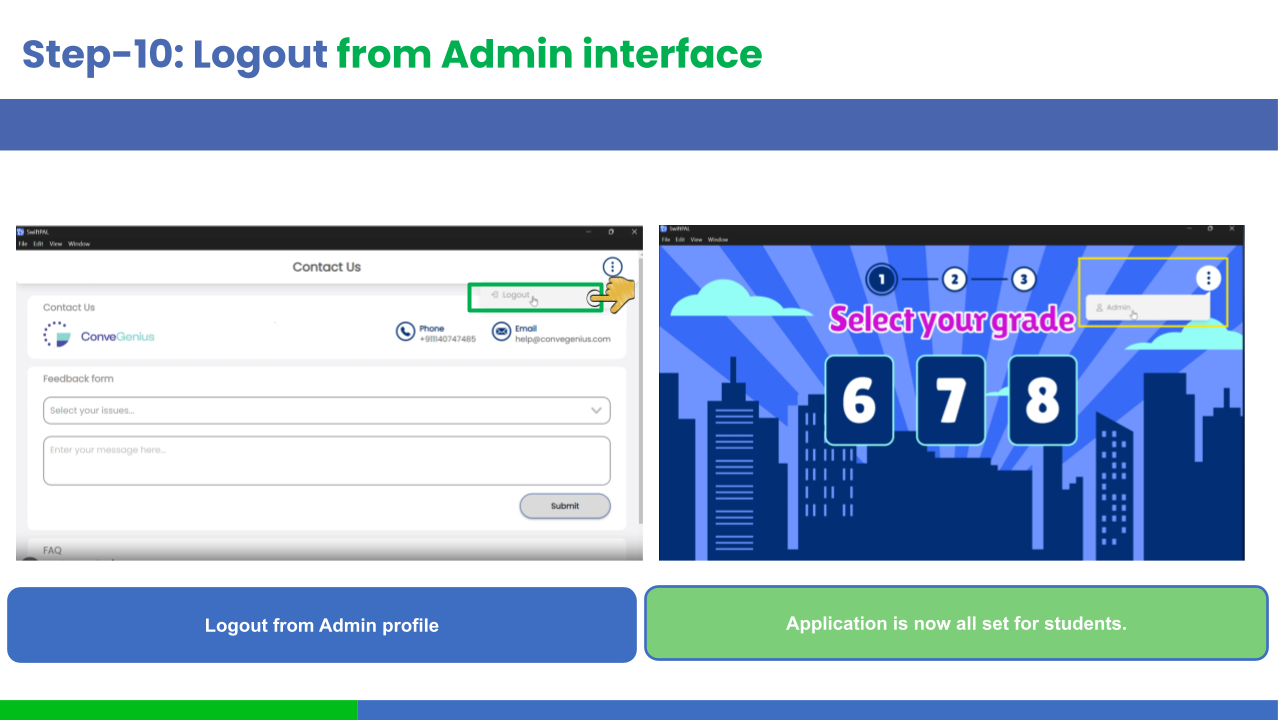
To log out,go in top right corner. Click on 3 dots/ Kabab to open menu Click the "Logout" button in the SwiftPAL app. Once logged out, you will need to re-enter your login credentials to access the app again. If this does not work, please report the ...